Breeding and genotyping
Record plug checks and litters
Save the morning's checks, manage each dam's reminders and keep birth losses separate from later losses.
Before you start
- Have the observed check results or litter counts and dates. A litter needs its recorded breeding pair and, for a trio, the correct dam.
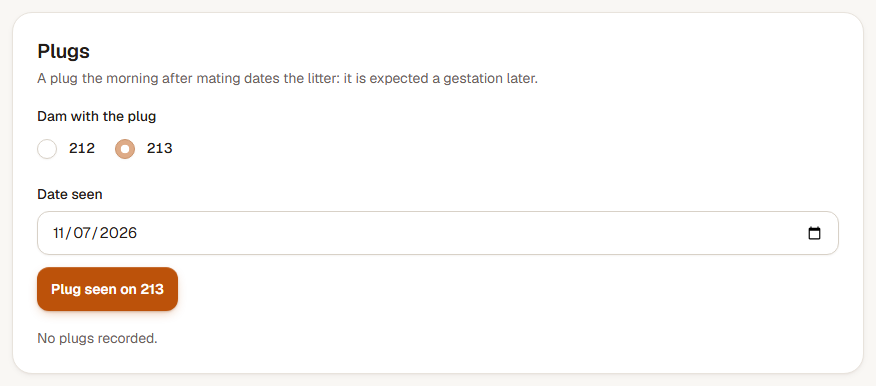
Step 1: Record the morning's checks
Open Plug checks, or choose Record all beside Plug checks on the Due list. Mark Plug or No plug for each dam checked, then save the checks. Leave an unchecked dam blank; she stays on the list.
A dam in a timed mating first becomes due the morning after she joins the male. A recorded plug adds the relevant separation and expected-litter reminders.
Step 2: Adjust a dam's checks or resolve a mating
Open her pair record and expand her check controls. Use Change plug checks to Stop checks, Resume checks, or set Last check day, then choose Save plug checks. Resuming starts again tomorrow and clears the previous end date.
When a mating has ended without a recorded litter, open Resolve this mating, enter What happened? and choose Resolve mating. The observed plug stays in history; its birth and separation reminders end.
Step 3: Record the litter
Choose Record litter from the pair or cage, or open the new-litter form. Select the pair and correct dam, enter Birth date and Pups born, then enter Dead at birth. Add the surviving male and female counts when known, an optional Litter ID and notes.
If the birth date looks unusually early for the pairing, read the warning and check the date before confirming. Save the litter and inspect its born, dead and alive counts.
Step 4: Record a later loss
Open the litter and choose Edit litter. Keep Dead at birth as the birth count, and enter the cumulative number that Died after birth before weaning. Adjust the surviving male and female counts to agree, then choose Save litter.
For an older litter with unknown birth losses, leave Dead at birth blank and maintain the cumulative Found dead total. Enter the birth count when you know it, including zero. That enables the birth-size and weaning-loss comparisons.
Check the result
Each check belongs to the correct dam. The litter preserves its starting count: six born alive followed by one later death still means six live pups at birth and five remaining.
If the pup counts do not agree
Check Pups born, the separate loss counts and the surviving male/female counts. Dead at birth plus Died after birth cannot exceed Pups born, and the sex counts cannot exceed the pups still alive. Correct the counts in Edit litter and save again.