Breeding and genotyping
Set up and manage breeding
Choose breeders, review relatedness and housing, and record separation or retirement.
Before you start
- The sire and dams must already have animal records. Check their identities, housing and recorded genotypes before setting up the pair or trio.
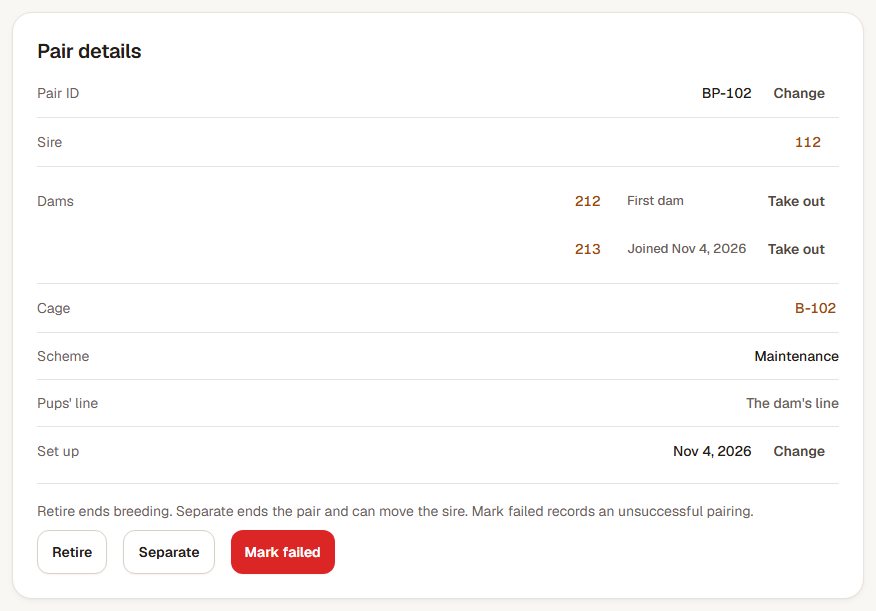
Step 1: Choose the breeders and purpose
Open Breeding and choose New pair. Search the sire and dam lists by ID, ear tag, cage or line. Choose one sire and the dam or dams, then set Cage, Set up on and Purpose. Add a Pair ID if your lab uses one.
For parents from different lines, choose the pups' line from the choices shown. Review the housing changes listed under When you pair them.
Step 2: Read the breeding checks
The checks explain any recorded relationship between the selected animals. F is the inbreeding coefficient: it estimates the chance that a pup's two copies of a gene came from the same ancestral copy. Read the relationship explanation alongside the number.
Resolve any blocking check. For a warning you intend to accept, tick I understand the warnings above, then choose Pair them up. Open the saved pair and confirm the breeders and cage.
Step 3: Record separation or the pair's outcome
On the pair record, Separate ends the pair and can move the sire to another cage. For a trio, use the named dam's Take out action when only she is leaving. Check the destination before confirming.
Retire ends that pair's breeding while keeping its animals housed. Mark failed records an unsuccessful pairing. These actions leave the earlier breeding history available.
Step 4: Retire an individual breeder when needed
Open the animal and choose Retire from breeding. Enter the retirement date and reason, choose Review changes, and check what will happen to any active pairs before confirming. The animal remains alive and housed, but is excluded from future breeder choices.
Use Return to breeding with a reason to make that animal eligible again. Returning it does not recreate a retired pair; set up the next pairing explicitly.
Check the result
The breeding record names the chosen parents, purpose and housing. Pair outcomes and individual breeding retirement are recorded separately.
Correct a pair outcome recorded in error
Open the ended pair and choose Correct outcome. Select the intended outcome, enter Reason for correction and choose Save correction. The earlier outcome stays in history. Check housing and any removed dams separately because correcting the outcome does not move them back.