Records and housing
Move mice and close empty cages
Move one mouse or a selected group, split or combine cages, and close a cage when it is empty.
Before you start
- Check the mice that are moving and the destination cage. You need permission to change records in their lab.
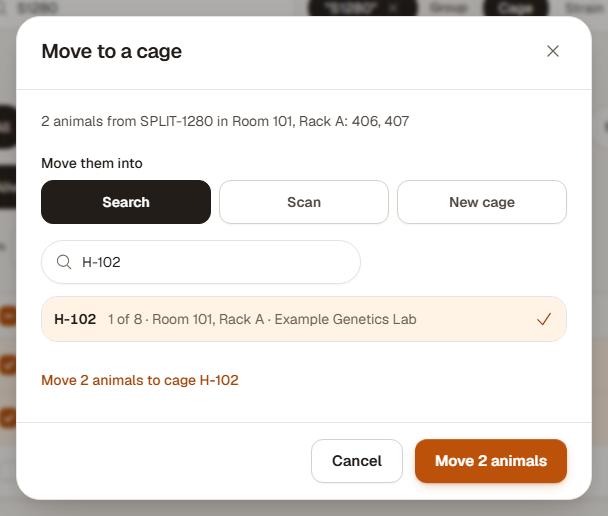
Step 1: Choose the mice that are moving
Open an animal and choose Move, or tick the mice in Animals and choose Move to cage from the actions at the bottom. To split a cage, select only the mice leaving it. To combine cages, select the mice moving into the shared destination.
Step 2: Choose their destination
Choose an existing cage by its number or create a new one. Check the new cage's number, type, capacity and location. Review the listed animals before continuing so mice that are staying put are not included.
Step 3: Review and save the move
Read the destination summary and any housing, breeding or protocol warning. Confirm the move when the details match the work being recorded. Open the destination from the success message and check its residents; the animals' histories retain the move.
Step 4: Close the empty source cage
Reopen the source cage. When no animals or counted groups remain, choose Close cage and confirm. Its status changes to retired and its history stays available.
Check the result
The selected mice appear in their destination cage. A closed empty cage no longer appears among active housing records.
If the destination is wrong
Cancel before confirming and choose the correct cage. If the move has already saved, open the affected animals and record a move to the correct destination; the history keeps both movements. A cage that still has residents must be emptied before it can be closed.