Planning and lab access
Check protocol counts and renewals
Check approved and used counts, assign selected mice and record an approved renewal.
Before you start
- Have the approved protocol details and renewal dates. In a core facility, the facility admin manages protocols; lab members can assign animals they are permitted to edit.
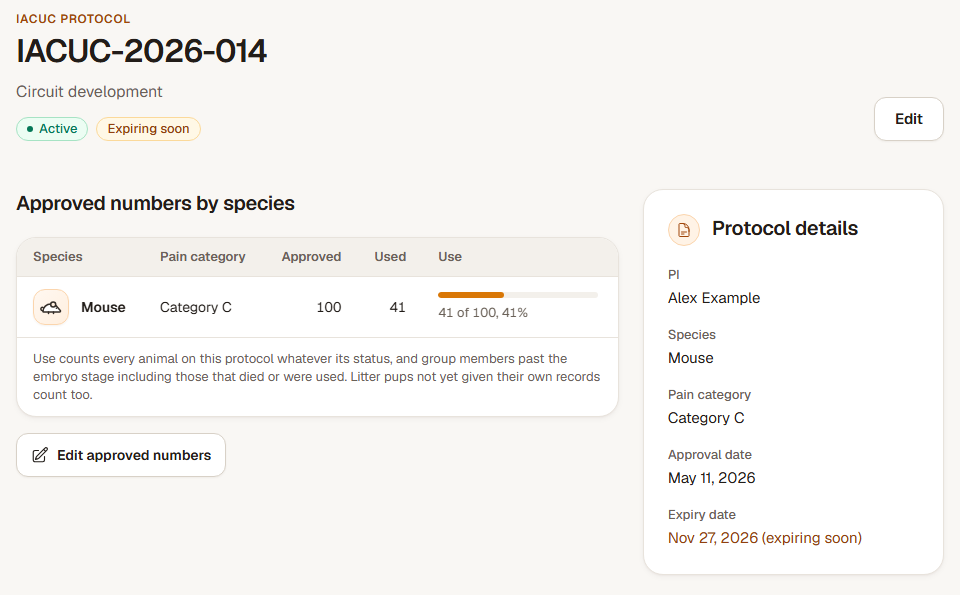
Step 1: Read the protocol's approved and used counts
Open the protocol by its number. Check its status, expiry and approved allowance alongside the used count. Read the counting explanation and any species-specific allowances shown.
Protocol use can include litter pups that do not yet have individual records. The live animals and occupied cages shown below describe current housing, so they need not equal total use. Today uses the same protocol-use count for its watch list.
Step 2: Assign selected mice
Open Animals, tick the mice to assign and choose Assign protocol. Select the intended protocol, review any species, expiry or allowance warning, and confirm. Reopen the animals or protocol to check the assignment.
Step 3: Record the approved renewal
On the protocol, choose Edit. Enter the new Expiry date from the approval and set Status to Active. Check any other approved details that changed, then choose Save protocol.
Return to the protocol to verify the date and status. Its history records the change with the earlier values.
Check the result
The protocol shows its current approved details and recorded use. Assigned mice and the renewed expiry are visible in the relevant records.
If another person changed the protocol
The form keeps your unsaved values and reports the conflict. Note the details you intended to change, reopen the current protocol, compare the newer values and apply only the still-needed update.