Planning and lab access
Count mice and occupied cages
Compare counts by lab, line and protocol while keeping live animals, housing records and occupied cages distinct.
Before you start
- Decide what you need to count: live individual animals, occupied cages, all active housing records or protocol use. Use the same lab and line scope when comparing pages.
Step 1: Check the live animals
Open Animals and check the status, lab and line filters. Use Table to compare individual records or the grouped view to see them together. Read the list's total rather than counting only the rows on the current page.
Step 2: Read the housing counts in context
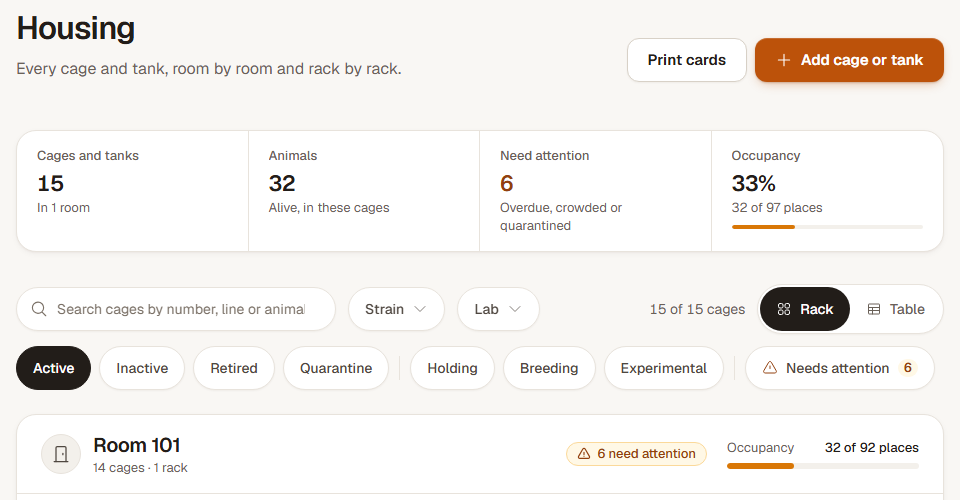
Open Housing and apply the same lab or line filters. Rack and Table show the matching housing records. The Animals figure counts live animals in those cages; a mouse with no cage is outside that housing count.
Housing's Cages and tanks figure includes matching empty cage records. Today and plan cage usage count occupied active housing. An imported empty cage can therefore appear in Housing without increasing the occupied-cage count.
Step 3: Open the line or protocol for its own totals
Open Lines to inspect a line's animals and cages, or Protocols to inspect the approved and used counts. A protocol's used count can include litter pups without individual records, so it can differ from the number of live mice listed in cages.
When sharing a count, include the date and the lab, line, status or protocol filters you used.
Check the result
You have a count with a clear scope, and can explain why empty housing, unassigned mice or unweaned pups make two totals differ.
If two pages show different totals
Match the lab and line filters first. Check whether one total includes empty cages, whether every mouse has housing, and whether the protocol includes unweaned pups. Open the records behind the difference before changing data.