Planning and lab access
Manage lab members
Add a named colleague, set the right role and remove access when their work in the lab ends.
Before you start
- Have the colleague's name and the email address they use for their ConductScience account.
- A single-lab admin or PI manages colony members. A facility admin manages facility membership; a facility lab's PI can manage membership of their own lab.
Step 1: Add the colleague in the right place
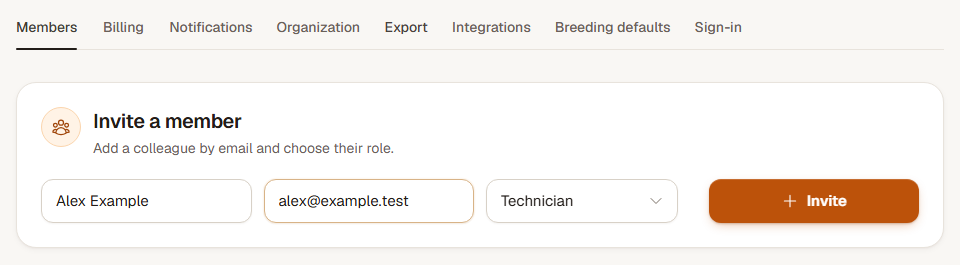
For a single lab or facility-wide membership, open Settings, Members and find Invite a member. Enter Name and Email, choose the appropriate Role and press Invite.
For membership of a lab within a facility, open that lab's page. Enter Name and Email, or choose an existing facility member, select Lab role and choose Add member.
Step 2: Check the saved membership
Find the colleague in the members list and verify their name and role. Read the confirmation for the invitation's email outcome. They should sign in with a ConductScience account using the same email address; adding membership does not depend on successful email delivery.
Step 3: Change a role or end access
Choose a new role beside the person, use Save role and confirm the change. Use Remove when they should no longer belong to the colony or facility lab, and confirm the named membership being removed.
Sign out on all devices ends the person's current sessions. It leaves their membership in place, so they can sign in again. Remove the membership when access itself should end.
Check the result
The member list shows each colleague's current role and lab access. Removing a colleague keeps the colony's records and earlier activity history.
If you cannot add or change a member
Check that you are managing the correct colony or facility lab and have the required role. A facility PI should use their own lab page rather than the facility-wide invitation form. If the plan's user limit is reached, ask the admin to review existing memberships or the plan before adding another person.