Breeding and genotyping
Track samples and genotype results
Find mice awaiting sampling, print the list, record samples taken and enter or import confirmed results.
Before you start
- Check that the mice have the correct line and that the line lists the genes requiring results. Sampling and genotype tracking are available on every plan, including Free.
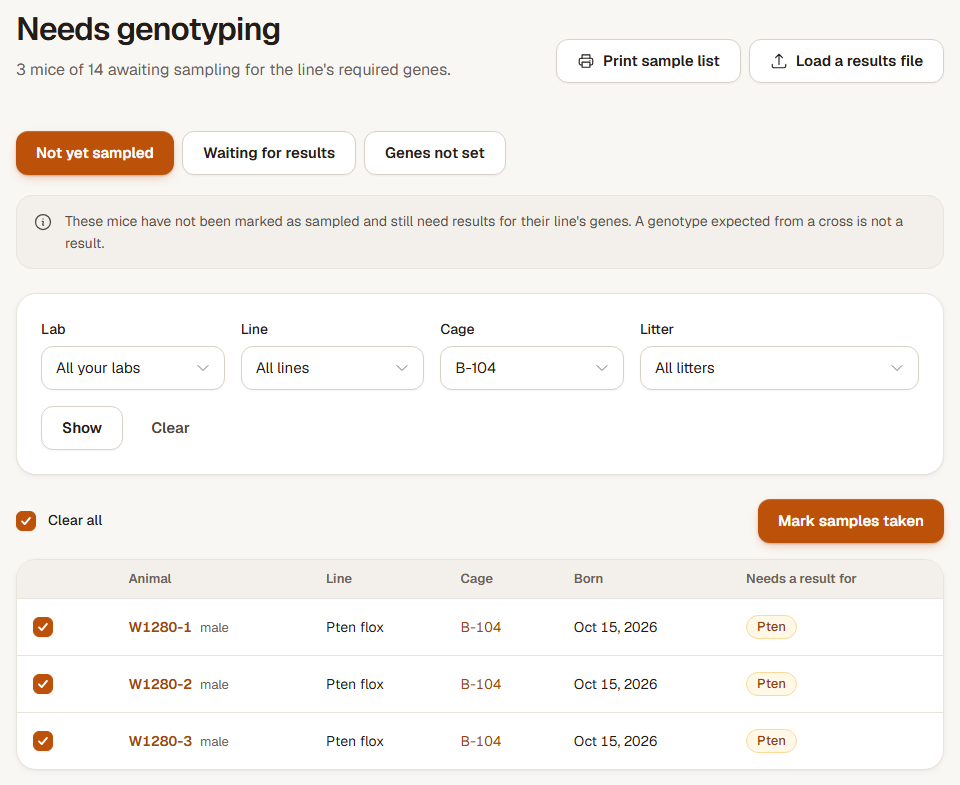
Step 1: Choose the queue and print the sample list
Open Needs genotyping and choose Not yet sampled. Narrow the list by lab, line, cage or litter, then choose Print sample list to keep those filters and print in rack order.
Genes not set lists unsampled mice without configured line genes, or without a line. Check the line before deciding which samples are needed.
Step 2: Record the samples that were taken
Tick the mice that were sampled and choose Mark samples taken. Confirm the selected count. Mice still missing required results move to Waiting for results.
Step 3: Enter results by hand
In Waiting for results, choose the mice, cage or litter and open Enter results. Enter the confirmed calls and save the results. A mouse stays in the queue until it has the results its line requires; a genotype predicted from a cross does not count as a measured result.
Step 4: Load a results file
For a spreadsheet, open Import and choose Genotyping results. Map the animal ID or ear tag and the gene/result columns. Choose the result method and date format, then select Check the file.
Review matched animals, changed calls and any IDs that were not found or were ambiguous. Choose Load results with the displayed count when the preview is correct. Reopen Waiting for results to see what is still outstanding.
Check the result
Sampling status and confirmed genotype calls are recorded separately. Animal records and Table view show the saved results, including confirmed wild type.
If a results file matches the wrong animals
Go back to the columns and correct the ID or ear-tag mapping before loading. Add missing animal records first. For a load already saved in error, use Undo this load within 24 hours and read the summary of what was restored; records changed afterwards are kept.